MODULE 02 · LESSON 6 of 8
Notes-Book Back Cover
Complete your Goals, Meaning, & Purpose Notes-Book back cover using the SchoolAI Assistant to develop a new Teaching/Classroom SMART Goal.
Step 1:
Use the SchoolAI assistant to develop a new/different Teaching/Classroom SMART Goal:
- Click on the link below to access the SchoolAI Assistant:
https://student.schoolai.com/dot/spaces/join?code=AWSM-KGFK - Enter your initials instead of your full name to log on.
- Create a new & different SMART Goal (different from the one you developed on pages 5 & 6) interacting with the SchoolAI Assistant.
- Be sure to direct the AI Assistant, rather than just going with its flow…this is your goal.
- Start fresh with #1 at any time you are not liking the goal or process.
Step 2:
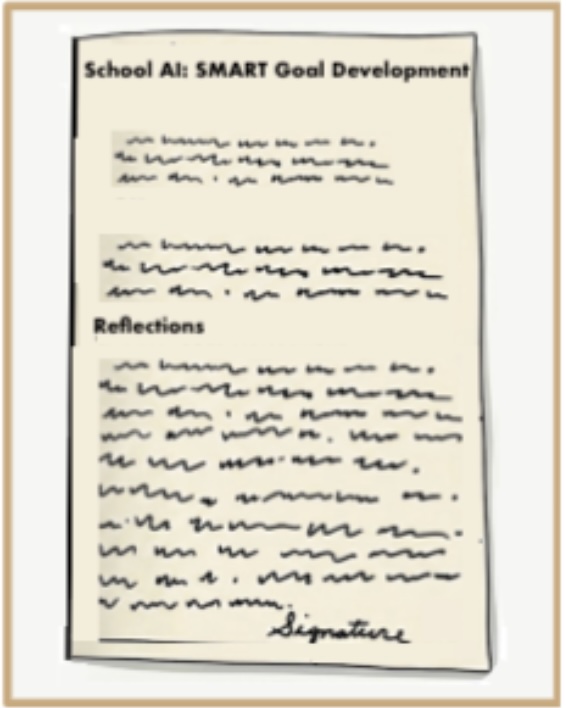
On the top half of the back cover of your Notes-Book, below the heading: School AI: SMART Goal Development
- handwrite your SMART Goal (word for word) and include any relevant details provided by the AI Assistant to support reaching your goal.
Step 3:
Write Your Reflection & Sign the Back Cover
- Below the heading, Reflections,handwrite a 5–6 sentence Reflection that:
- Describes your experience using the SchoolAI Assistant.
- Compares the quality of your original SMART Goal (Pages 5–6) with the School AI SMART Goal.
- Addresses how likely you are to follow through using the Goal Tracker app.
- End your reflection with your signature (in ink, not pencil).
(Click on image to enlarge.)